What Is an AI Morning Briefing And Why Every Remote Worker Needs One
- Marina Maksimovic
- 2 days ago
- 10 min read
You're starting your day by opening 10 apps. There's a better way — and it takes under 60 seconds.
It's 8:47 am.
Before you've had your first sip of coffee, you've already opened Slack to check for overnight messages, switched to Gmail to scan for anything urgent, clicked over to Asana to see what tasks moved while you were offline, and checked your Outlook calendar to see when your first meeting is. You've been "at work" for four minutes and you're already mentally fragmented.
This is the morning routine of almost every remote worker in 2025 — and it's costing far more than just time. It's costing you the one thing your best work depends on: a calm, focused start to the day.
There's a better way. It's called an AI morning briefing, and it changes the entire equation of how your day begins.
275
Interruptions the average worker receives per workday
Source: Microsoft
23min
To regain deep focus after a single notification interruption
Source: UC Irvine
10+
Apps the average knowledge worker switches between daily
Source: Asana
$450B
Lost annually by the US economy to context switching
Source: Industry Research
The problem with how most remote workers start their day
The typical remote worker morning looks something like this: wake up, check phone, see Slack notifications, feel mild anxiety, open laptop, switch between four or five apps trying to piece together what happened overnight, what's urgent, and what can wait.
This process is exhausting and it doesn't even work that well. Because each app only knows about itself, you never get a coherent picture. Slack shows you Slack. Gmail shows you Gmail. Asana shows you Asana. None of them know what the others are doing, which means the task of synthesising everything into a clear "here's what matters today" picture falls entirely on you, every single morning.
And you have to do this before you've fully woken up, before your coffee has kicked in, and before your brain has properly shifted into work mode.
"The way most people start their workday is the equivalent of trying to read a book by opening it to a random page in each chapter simultaneously — and wondering why the story isn't making sense."
The cognitive cost of this "app archaeology" is real and documented. Research from the University of California Irvine found that it takes an average of 23 minutes to fully regain focus after an interruption. If your morning routine involves switching between five apps — that's five context switches before you've even started your actual work.
By the time most remote workers sit down to do focused work, their cognitive budget is already partially spent.
→
Want to understand the real cost of this fragmentation? Read what happened when one writer tracked 30 days without notification management — the numbers are alarming.
What is an AI morning briefing?
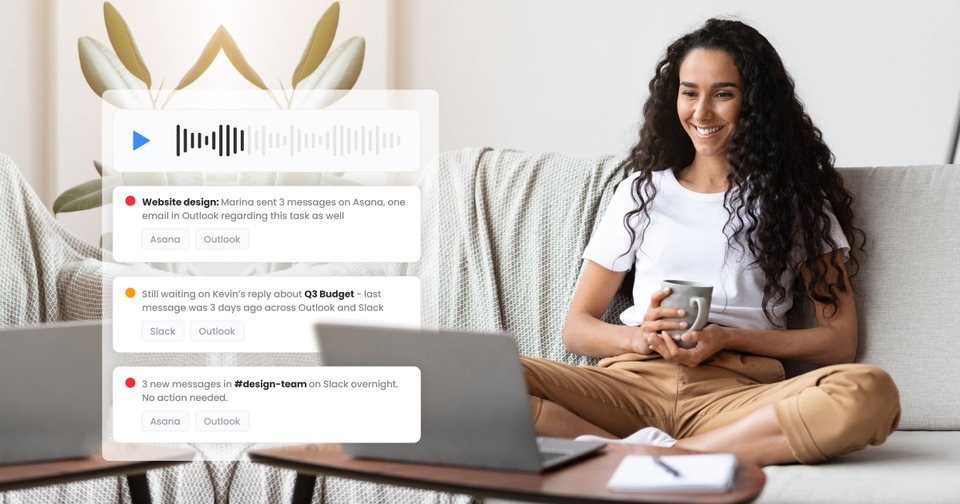
An AI morning briefing is exactly what it sounds like: an AI-generated summary of everything that happened across your work tools while you were away, distilled into a concise, prioritised update you can consume in under a minute.
Instead of opening Slack to read 47 messages, Gmail to scan your inbox, and Asana to check task updates — you get one synthesised brief that has already done all of that for you. The AI reads across all your connected apps simultaneously, identifies what's genuinely important, filters out the noise, and presents you with a clear picture: here's what moved overnight, here's what needs your attention today, and here's what you can safely ignore.
The best implementations of this deliver the briefing as audio — meaning you can listen while making coffee, getting dressed, or on your morning walk. By the time you sit down at your desk, you're already fully oriented.
THE KEY DIFFERENCE
A standard notification summary just shows you a list of what happened. An AI morning briefing interprets what happened — separating the urgent from the informational, grouping related threads, and surfacing the things that actually need action from you today. It's the difference between a pile of mail on your doorstep and a personal assistant who has sorted through it and is ready to brief you.
Why remote workers need this more than anyone
Office workers have informal information channels that remote workers don't. A colleague walking past your desk and mentioning "hey, the client came back on that proposal" gives you a quick, low-friction update without requiring you to go looking for it. Remote workers have no equivalent — all context has to be actively retrieved from apps.
This asymmetry gets worse as teams scale and tool stacks grow. By the time a remote team is using Slack for communication, Gmail and Outlook for external email, Asana or Jira for project management, and Google Meet or Teams for calls, the morning "sync up" task has become a significant cognitive undertaking that nobody officially budgets time for.
The result is one of two things: remote workers either start their day fragmented and reactive, responding to whatever was most recent rather than most important — or they try to batch and check apps less frequently, but then miss things that needed a faster response.
An AI morning briefing solves this by doing the synthesis for you. You don't have to choose between staying on top of everything and protecting your morning focus. The AI does the triage work while you sleep, and hands you a clear, prioritised brief when you wake up.
This is exactly what Notico's Coffee Briefing was built to do — a personal AI briefing, every morning, across every app you use
What a good AI morning briefing actually covers
Not all AI summaries are created equal. A good AI morning briefing should cover five things:
1. What happened while you were offline
A clear summary of significant activity since you last logged off — important messages, task updates, project changes, and new requests that came in. Not every notification, just the ones that moved something meaningful.
2. What needs your attention today
The AI should separate "things that happened" from "things that require your action". A colleague sending a status update is informational. A client asking a direct question needs a response. A task deadline moving is relevant. The briefing should make this distinction so you're not treating all updates as equally urgent — because they're not.
3. Tasks and follow-ups you haven't addressed
The AI should track threads that are still open — messages you haven't replied to, tasks that were assigned to you but haven't been acknowledged, or follow-ups that were promised but not yet sent. These are the things that slip through the cracks in a fragmented notification environment and cost you client trust and team relationships over time.
4. What you can safely deprioritise
Just as important as surfacing what matters is filtering out what doesn't. Automated task notifications, group channel activity that doesn't involve you, routine status updates — a good briefing filters these so you don't have to manually triage them yourself.
5. Where each project stands
For knowledge workers managing multiple projects simultaneously, a morning briefing should give a quick project-level view: what moved on each project yesterday, and what the most important next action is. This gives you the mental map you need to prioritise your day before you've opened a single app.
→
Struggling to triage notifications across multiple apps? See the top reasons notifications get buried in Slack, Gmail and Asana — and how a unified inbox changes the equation.
The Coffee Briefing: how Notico makes this real
NOTICO FEATURE☕ The Coffee Briefing
Every morning, Notico's AI reviews everything that happened across your connected apps: Slack, Gmail, Outlook, Asana and more, and prepares a personal audio briefing under 60 seconds. Press play while you make your coffee. By the time you sit down, you know exactly what needs your attention and what can wait.
The AI filters out purely informational updates and focuses on what actually requires action: messages that need a reply, tasks that need acknowledgment, follow-ups you haven't sent, and threads still waiting on a response from you. You don't just hear what happened, you hear what you need to do about it.
The Coffee Briefing is the only AI morning briefing that sees across all your apps simultaneously, because Slack, Gmail and Asana will never do this for each other. Notico sits above all of them and connects the dots they can't.
How an AI morning briefing changes your workday, not just your morning
The benefits of a well-structured morning briefing compound throughout the day in ways that aren't immediately obvious.
You make better decisions earlier. When you start the day with a clear picture of what matters, your first hour of work goes to the highest-priority things instead of whatever happened to land in your inbox last. Over a week, this compounds into significantly better outcomes on the work that actually moves projects forward.
You respond faster to the right things. Because the briefing flags what needs a reply, you never spend two hours deep in a focus block only to surface and realise there was a client question that needed a same-day response. You know it's there. You can respond before starting your deep work, or schedule a specific time to handle it — rather than letting it become a missed deadline.
You feel less anxious. A significant portion of remote work stress comes from the nagging feeling that something important might be happening somewhere that you're not seeing. A morning briefing that covers all your apps simultaneously removes that anxiety at the start of the day. You're not wondering what you might have missed — you know you haven't missed it, because an AI checked for you.
You protect your deep work time. When your morning orientation is done in 60 seconds instead of 20 minutes, you reclaim that time for focused work. Over a working week, that's an extra hour and forty minutes of protected time. Over a year, it's more than a full week of work reclaimed from app-switching and notification archaeology.
The goal isn't to check your messages faster. It's to stop checking them at all — and let an AI do the work so you only see what actually matters."
What to look for in an AI morning briefing tool
As AI productivity tools proliferate, it's worth being specific about what makes a morning briefing genuinely useful rather than just another layer of noise.
Cross-app intelligence is non-negotiable. A tool that only summarises one app isn't a briefing — it's just a better notification list. The value of a morning briefing comes entirely from its ability to see across all your tools simultaneously and synthesise a coherent picture. If your briefing tool only integrates with one or two apps, the synthesis is incomplete and the value is limited.
Priority filtering matters more than completeness. You don't want to hear everything. You want to hear the right things. A tool that gives you a complete record of everything that happened is an archive, not a briefing. The AI needs to apply real priority logic — distinguishing between messages that need action and those that are purely informational.
Audio delivery unlocks the real value. Reading a briefing on screen is still screen time. Audio delivery means you can consume your morning update while doing something physical — making coffee, getting dressed, going for a walk — keeping your eyes and hands free for the actual start of your day. This is what transforms a briefing from a productivity tool into a genuine lifestyle change.
It should understand your context, not just your apps. The best briefings learn which threads are important to you, which projects are in active phases, and which people's messages deserve prioritisation. Over time, the AI should get more accurate at filtering — not less.
→
See how Notico handles notification overload for freelancers — and how the Coffee Briefing fits into a complete notification management system.
Building the habit: making AI briefings work for your morning
Like any productivity system, an AI morning briefing only delivers its full value if you build a habit around it. Here's what works:
✅ HOW TO MAKE THE MORNING BRIEFING HABIT STICK
Listen before opening any app. The entire value of a morning briefing disappears if you've already checked Slack before you play it. Make the briefing the very first work-related thing you do — ideally before you sit down at your desk.
Pair it with something physical. The habit sticks fastest when it's anchored to an existing morning routine. Make coffee, press play. Go for a ten-minute walk, wear earphones. The physical action triggers the habit and ensures you're not starting your day on a screen.
Trust it to filter. The biggest obstacle to building this habit is the anxiety of not checking your own inbox. You have to trust that the AI is surfacing what matters and filtering what doesn't. That trust builds over the first week — stick with it.
Act on the brief, don't re-verify it. When the briefing flags something as urgent, respond to it directly — don't open the app and scan from the beginning. If you do that, you've undone the entire benefit. The briefing is your single source of truth for the morning.
Give it 5 working days before judging it. The first morning always feels slightly uncomfortable — you're changing a deep-rooted habit. By day three, most users report feeling noticeably calmer at the start of their day. By day five, going back to app-archaeology feels unthinkable.
The future of morning work routines
The current morning routine for remote workers — open Slack, open Gmail, open Asana, try to piece things together — is not a deliberate design. It's the accidental result of everyone building apps that are good at capturing attention but terrible at sharing context.
AI morning briefings represent the first real solution to this problem. Not a workaround or a productivity hack — a genuine structural change in how the start of the workday works. Instead of you doing the synthesis work, the AI does it. Instead of your morning belonging to your notifications, it belongs to you.
The knowledge workers who build this habit earliest will have a meaningful productivity and wellbeing advantage over those who are still opening 10 apps at 8:47am five years from now.
The question isn't whether AI morning briefings will become standard. The question is how long you want to wait before you make the switch.
Your AI morning briefing is waiting.
Notico's Coffee Briefing analyses everything across Slack, Gmail, Outlook and Asana overnight — and plays you a personal 60-second audio brief before your first meeting. Join 200+ knowledge workers already on the waitlist.
What does your current morning routine look like — do you check notifications before or after coffee? Drop it in the comments. We're building Coffee Briefing based on exactly this kind of feedback.